
Victorian rental law updates: What you need to know
Navigate new Victorian rental law changes confidently. Learn what property managers need to know and how Reapit PM + Lettings simplify compliance.
What’s changing & why it matters
The Victorian government is introducing significant changes to rental laws, many of which will be taking effect from November 25, 2025.
We understand that regulatory changes can feel overwhelming, and we want to assure you that we’re here to support your business every step of the way. This blog will be regularly updated to keep you informed as changes occur.
While Reapit has made every effort to ensure you are compliant with the new legislation, it is ultimately your business' responsibility to ensure that your processes align with your agency’s own interpretation of the law.
To read about the legislation changes in more detail, you can follow this link to the Victorian Consumer Affairs website.
For a list of action items, scroll down.
Key dates
Below is a summary of the changes that will require you to adjust your process in Reapit Lettings and Reapit PM and their corresponding timelines for effect:
NEW CHANGES - Effective 17 June 2026
- With guidance from Consumer Affairs Victoria:
- Removal of the "About Me" section (If you would like to provide any other information to support your application, please do so here. (This is optional))
- Renaming of the Bank Statement document type to Bank statement (without transaction details) to match the Victorian prescribed form.
Effective 25 November 2025
- Ban on all types of rental bidding
- Extension of notice periods for rent increases and certain notices to vacate
- New rules to protect renters’ personal information
Effective 31 March 2026
- New prescribed form for rental applications
What this means for your Reapit workflow
These legislation changes require agencies to adapt their workflows, and Reapit will evolve accordingly. We already have a number of settings, processes and policies in place to help your agency remain compliant.
A video walkthrough of the updates
In this video, we walk you through the latest updates to Reapit Lettings and 2Apply, created to support the new legislative changes coming into effect in Victoria at the end of March. It’s a simple, step‑by‑step way to understand each update and get confident with what’s changing.
What you need to do for the changes effective 17 Jun 2026
These changes have been developed with guidance from Consumer Affairs Victoria to ensure the form fully aligns with the recent changes to Victorian rental legislation.
The updates are:
- Removal of the “About Me” section: This optional free‑text field will no longer appear, as it is not included in the prescribed Victorian application form.
- Renaming the Bank Statement document type: The Bank Statement document type has been renamed to Bank statement (without transaction details) to match the Victorian prescribed form.
These changes require no action from you.
What you need to do for the changes effective 31 March 2026
New prescribed rental application form
Consumer Affairs states that ‘rental providers and their agents must use the prescribed form for rental agreement applications’. This new prescribed form was released by Victorian Consumer Affairs on Thursday 26 February 2026. We have now completed the work to align the 2Apply Victorian Application form with the new Victorian prescribed application form.
There are a number of settings in Reapit Lettings you will need to review in order to ensure compliance with the Victorian prescribed application form. These are as follows:
Action items - Settings to review:
Office Address
Ensure the office address is correct by navigating to Settings > Admin General Settings:

The full office address will now be displayed in the 2Apply application header when clicking on Agent Details

Tenant Database Checks
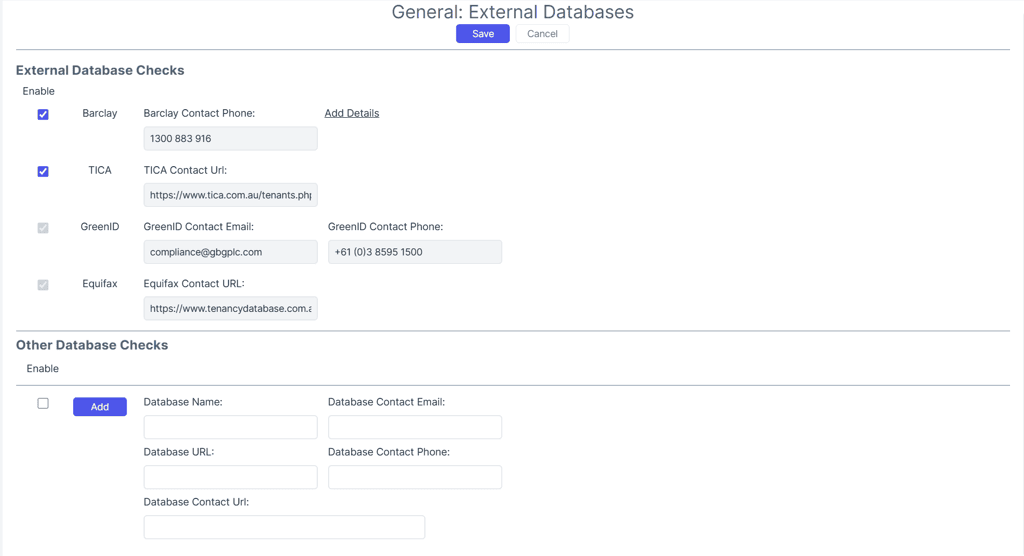
Navigate to Settings > Applications > General > Tenant Database Checks > External Databases. Here you will need to enter the details for all databases you use/checks when processing an application.
Note: If you use Reapit’s Tenancy Checks the details for GreenID and Equifax will already appear in the list.
Document Requirements
The document requirements have been defaulted to align with the prescribed rental application form. Change made in this section will no longer be reflected on your 2Apply application.
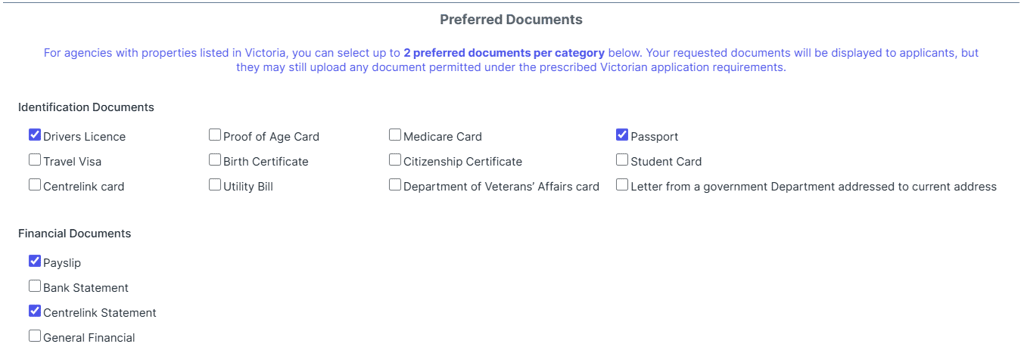
Preferred Documents
Nominate your preferred documents per category by navigating to Settings > Applications > General > Application Documents and selecting your preferred documents.
General Settings
Rent Price Editing
Rent price editing can no longer be enable as there is no Rent Amount field available in the prescribed rental application form
Net Income Calculation
The prescribed rental application form only allows for the collection of an applicant's net income. All income settings have been defaulted to using Net income calculations. Document
Field Visibility
Navigate to Settings > Applications > 2Apply > Field Visibility.
Show Required Monies
The Required Monies section appears in the Additional Info section of the application form. It can be removed by unticking “Show Required Monies”.

Show ‘About Me’
This additional information field is optional and appears the Personal Details - Your Details section of the application. I can be removed by unticking “Show ‘About Me’.

Note: The following fields will appear in the Field Visibility section but will not appear in the application form if turned on. These fields are not allowed as part of the prescribed application form:
- Show Emergency Contacts
- Show Pets Section
- Show Vehicles Section
- Show ‘Special Conditions’
- Show ‘Gender’
- Show ‘Smoker’
- Show ‘Student Info’
- Show ‘Occupation Title’
The following fields cannot be hidden as part of the prescribed application form:
- Show ‘Company Address’
- Show ‘Date of Birth’
Australian State or Territory in which a Rental Provider Resides
The state or territory a rental provider resides in can be added to the property by navigating to Property > Leasing > Applications > Information:
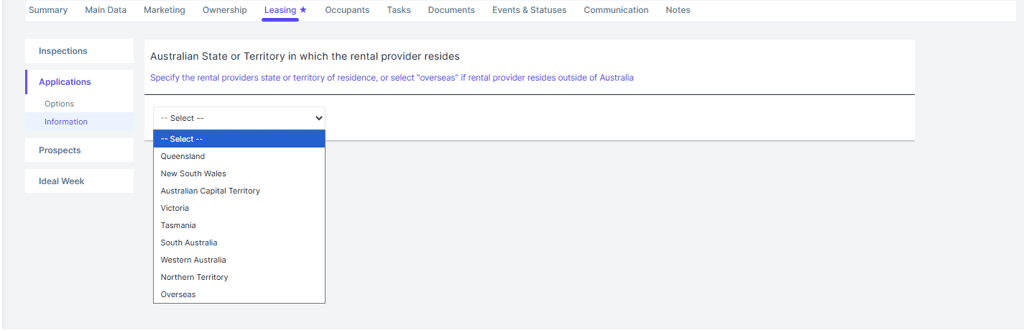
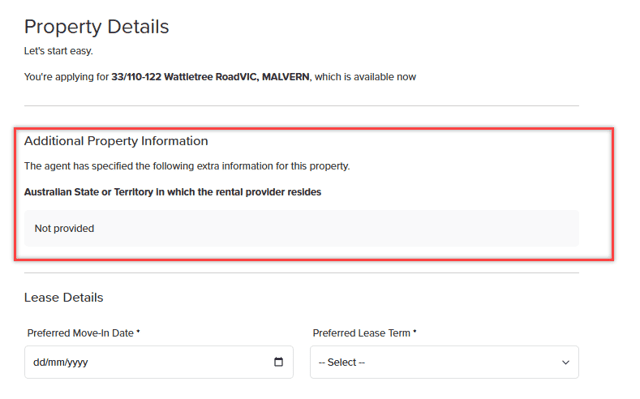
Once entered this information will be visible on the Property Details page:
Removal of the following pages/sections:
- Pets
- Vehicles
- Agent Questions
- Background Check
Changes to the Property Details page
- Rent Amount is no longer editable
- Removed the “Requesting following special conditions” field
Changes to the Applicants page
- Removed the Dependants section
- Added the “Total number of occupants intended to reside on the premises” question
Changes to the Your Details page
- Removed 'I am a Student' tick box
- Added the “Current Address” field
- Added the “Date of Birth” Field
- Renamed the “About Me” to: “If you would like to provide any other information to support your application, please do so here. (This is optional)”.
Changes to the Living History page
- Renamed the section to “Residential History”
- Removed the following fields when adding an Address:
- Rent
- Comments
- Reason for leaving
- The setting requesting a number of years’ worth of living history has been removed
Changes to the Identification page
- Updated the categories to match those allowed as per the prescribed rental application form:
- Identification documents
- The following documents will be available for an applicant to provide:
- Drivers licence
- Proof of age card
- Medicare card
- Passport
- Visa
- Birth Certificate
- Citizenship Certificate
- Student Card
- Centrelink card
- Utility Bill
- DVA Card
- Government Letter
- The following documents will be available for an applicant to provide:
- Financial documents
- The following documents will be available for an applicant to provide:
- Payslip
- Centrelink statement
- Bank Statement (Needs to be redacted)
- General Financial
- The following documents will be available for an applicant to provide:
- General documents
- Identification documents
- Only requesting 2 documents per category
- Note: You will no longer able to customise the document requirements. These are configured by default to ensure your compliance with the new legislation.
Changes to the Financials page
- Removed the question “Are you currently retired?”
- After adding an employment item only, the following fields are visible:
- Company Name
- Start Date
- End date
- Take-home Income Amount
- Employer Address
- Removed all employer contact details
- Removed the question "Is this a self employment?"
- Removed accountant and solicitor details
- Updated the Income Amount field to Take-home Income Amount
- Added the Annual Take-home Income field as a calculated value for the user to confirm that they have entered the correct amount
Changes to the References page
- Added a drop down to select the type of reference:
- Personal
- Employment
- After adding a reference only the following fields will be visible:
- Referee’s connection to applicant
- Contact First Name
- Contact Last Name
- Contact Email
- Contact Mobile
- Contact Phone
- Automatic references will send if the relevant information is entered for each reference type.
- Emergency Contact has been removed from References
Changes to the Terms and Conditions page
- Added a list of Tenancy Databases used by the agency
- Added the Rights and Obligations
Changes effective 25 November 2025
Ban on all rental bidding
According to Consumer Affairs, ‘agents and rental providers will be banned from accepting offers made by a renter to pay rent higher than the advertised amount or to pay more than one month’s rent in advance’.
The setting Prevent Higher Rent Offers already exists in Reapit Lettings, and we have already enabled this for you, so there is nothing you need to action for rent bidding in order to remain compliant.
If you wish to make any changes, the setting can be found by navigating to Settings > Applications > 2Apply > General. In the Lease Details section, tick Prevent Higher Rent Offers checkbox. This setting will prevent applicants from entering a rent amount higher than the advertised price.
.jpeg)
Extension of notice periods for rent increases
According to Consumer Affairs, ‘rental providers must give a renter 90 days' notice of a rent increase and certain notices to vacate’.
We have put together a separate article on managing rent reviews in Reapit PM for Victorian agencies, which you can read here.
New rules to protect renters' personal information
Reapit Lettings and 2Apply proactively made changes to its Data Retention Policy in late 2024 to align with state legislation Australia-wide. For Victoria, we’ve adjusted the deletion period for unsuccessful applications from 60 days to 30 days to ensure compliance.
Unsuccessful applications:
- All data from unsuccessful applications will be deleted 30 days after submission.
- This includes all documents submitted and information entered during the application process.
Successful applications:
- All data from successful applications will be deleted 3 years after submission.
- This includes all documents and information entered during the application process.
Data retention for reporting:
- Agents will still retain a record of the application submission for reporting purposes.
- This record will only include the applicant's name and some basic contact details.
- No other data from the application will be stored.
Prospect data:
- Data on prospects who enquired about a property will remain available.
Data Recovery:
- We no longer facilitate data recovery requests
- Users will need to download and store their data in another system, as Reapit Lettings will no longer be used for historical application data storage outside of the timeframes stated above.
Recommended Actions for Approved Applications:
- Approved applications should be saved into the agents' trust accounting software.
- This is necessary for maintaining records for insurance purposes.
Supporting your business
Should you have any questions or require assistance, please don’t hesitate to contact our Support team by initiating a Live Chat via the Support button at the top of your Reapit Lettings or Reapit PM systems between the hours of 8am and 6pm AEST, Monday to Friday.
Disclaimer: This article is intended as a general guide and does not constitute legal advice. Please seek independent legal counsel for guidance specific to your business or interpretation of the legislation.
see more blogs
Related content