.png)
What we launched in February 2026
Discover the latest Reapit updates, including a redesigned inspection flow, improved bond handling, invoicing enhancements, App Switcher additions, and upcoming VIC features.
Inspection power in your pocket
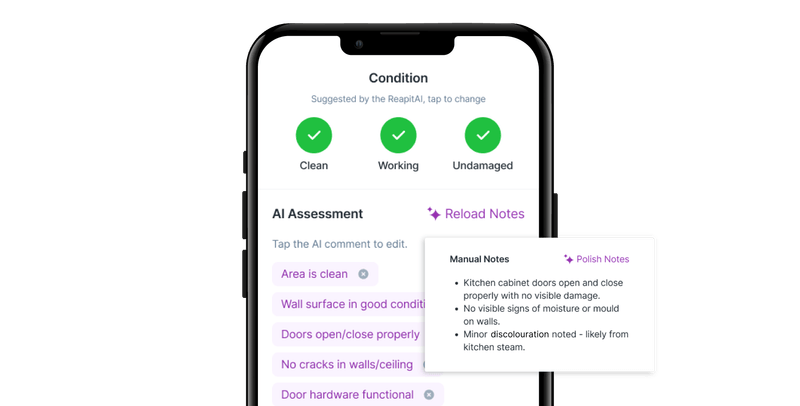
We’ve updated the inspection flow in the Reapit PM Inspect app to better match how you actually inspect properties - with your camera now driving the process!
What’s new:
- Select a section of the property and capture everything you need.
- Take your photos, mark them up on the spot, add suggested quick notes or write your own.
- Now in beta: AI analyses your photos and suggests notes based on them. Get in contact with your Account Manager if you’d like early access.
Learn how to navigate the new experience →
Bond handling built into your workflows
We’ve made a series of updates to how your handle bonds throughout a tenancy to make your job easier.
- When completing a lease renewal, you can now add the new required bond amount so that the bond value on the tenancy updates automatically. → See how here
- When initiating a rent review, you can now add a new bond amount so that the bond value on the tenancy updates automatically. → See how here
- Easily export bond reports into a CSV file for auditing purposes.
.png)
Reapit Proposals & Reapit Forms are on the App Switcher!
To make your life even easier, we’ve added Reapit Proposals and Reapit Forms to the App Switcher - easily jump between the modules you use everyday without logging in again.
And if you’re not already using these modules, this is a great opportunity to explore! Click on them in your explore menu and see how you could be using more of Reapit for more value.
Please note that Reapit Forms is currently only available to clients with Reapit PM Premium and Reapit Lettings, operating in QLD and NSW.
.png)
More value in your Lettings & PM integration coming soon
With our Reapit Lettings and PM integration, turning tenants from approved applicants into managed tenants takes under 60 seconds. Soon, with Tenant Payment References included automatically, there’s even less double data entry, saving you time and reducing errors.
.png)
Tenant invoicing updates
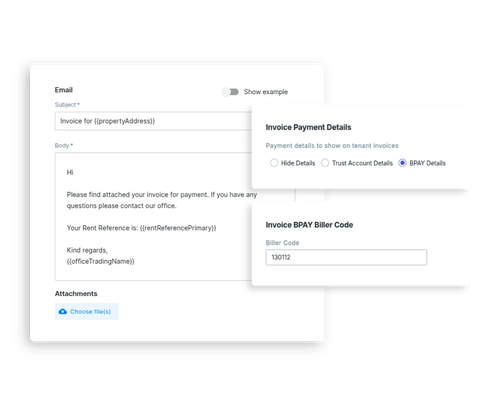
Great news - we've just released some updates to tenant invoicing we know are going to make your day that much easier! The best part? You can now edit the body of an invoice email and use merge fields to make this email customised for your office.
You can also now set your office's payment details as they'll appear on your tenant invoices, choosing from Trust Account or BPAY details, or even hiding the details altogether.
Plus, easily include your BPAY biller code on your invoice by default when you choose to show your BPAY details.
→ Learn how to use these updates
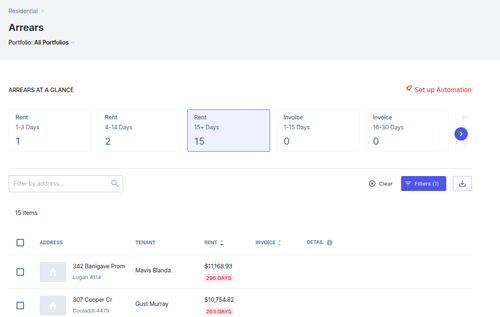
VIC specific arrears filters coming soon
We’re introducing a new arrears filter designed specifically for our Victorian clients. Soon, you’ll be able to view arrears at 15+ days, aligning with VIC legislation where a Notice to Vacate cannot be issued until day 15.
This enhancement has been a major request from VIC agencies, and we’re excited to be rolling it out shortly.
More bills information where you need it
Soon, if you head to the Bills tab on any property, you’ll see a complete history of bills for the given property, instead of just new or current ones. Quickly access past invoices, outstanding amounts and trends without hunting through your bills workflow.
Creditor Statements on the Creditor Details page
As on the Owner page, you can now see a history of statements issued to each Creditor on the Creditor Details page - no more searching through disbursement reports to find them!
Logical numeric ordering in your Owner Statements
Soon, when you view an Owner Statement, properties will appear in a more logical numeric order to make scanning these documents quicker and easier!
.png)
see more blogs
Related content