
Reapit lettings update
A new Application Processing experience is coming to Reapit Lettings
We're introducing a redesigned Application Processing experience.
The new interface brings key applicant information together, helping you review and compare applications more efficiently while maintaining all existing functionality.
Understand how an Application works in Reapit Lettings
Training Webinars
- Join one of our upcoming training webinars to get up to speed with the new Application Processing experience. Each session covers the same core content, including an overview of the new interface, application processing workflows, and practical tips to help you get the most out of the update.
Watch the on-demand training webinar now or register for a live webinar below.
We recommend registering for the session closest to your state's go-live date, giving you the opportunity to ask questions and receive guidance from our team as you prepare for the transition.
- 1. Session 1 - Tue 2pm - 27th Oct
- 2. Session 2 - Wed 2pm - 11th Nov
- 3. Session 3 - Tue 2pm - 17th Nov
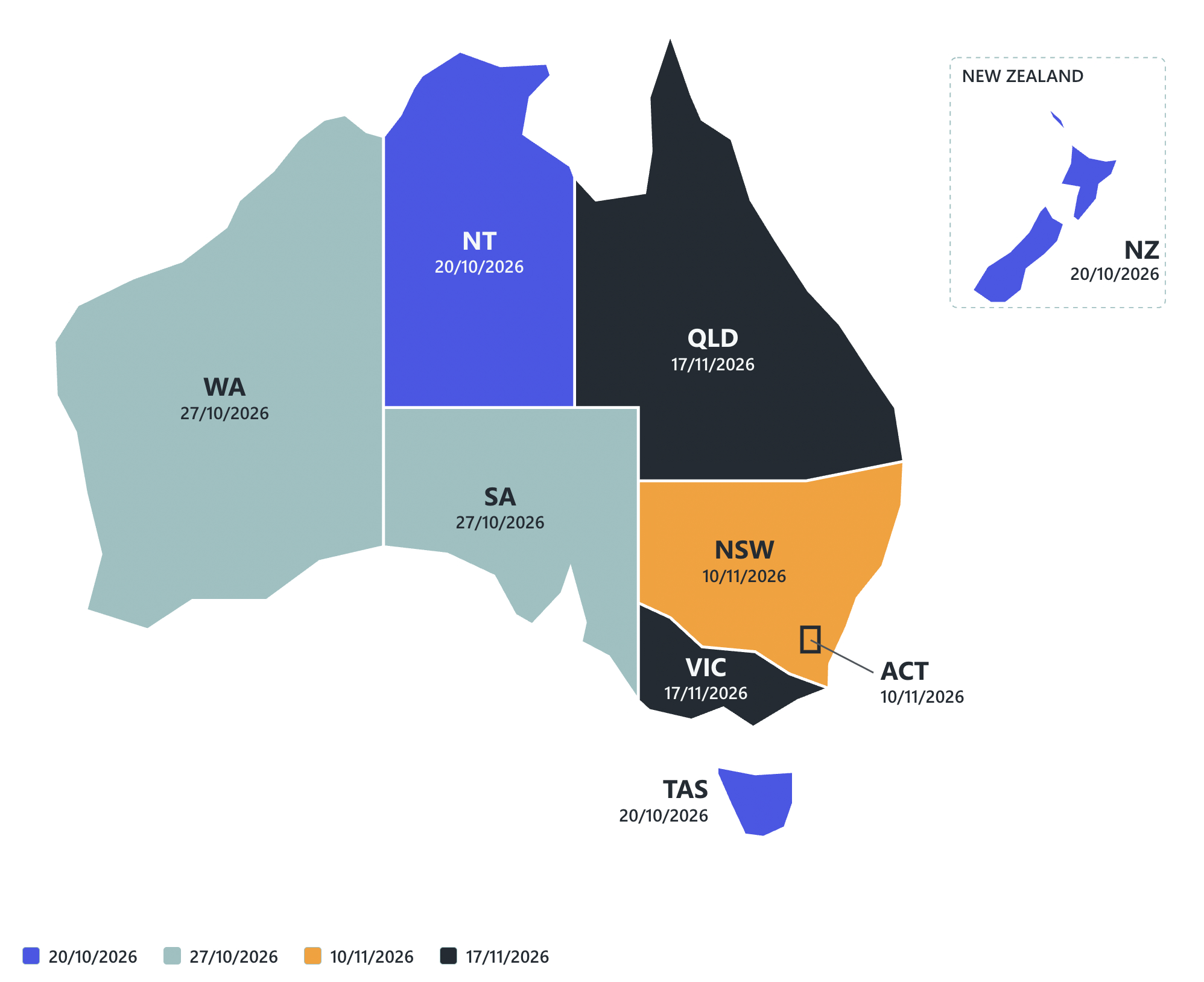
When does it go live in your state
- It rolls out by state and country on these dates.
NT, TAS, NZ - 20/10/2026
SA, WA - 27/10/2026
NSW, ACT - 10/11/2026
VIC, QLD - 17/11/2026
Would you like early access? Click here to go live sooner.
What's changing?
- A fresh new look for Application Processing: The application page has been redesigned. It looks different but with all the functionality you rely on.The new page is fully responsive, so you can process applications on an iPad between viewings.wing your database.
- Meet the new Overview tab: Applicant details, owner details and summary are now all in one place. You no longer need to hunt across multiple tabs.
- Shortlist straight from the application: Shortlisting is now a single button inside the application itself.
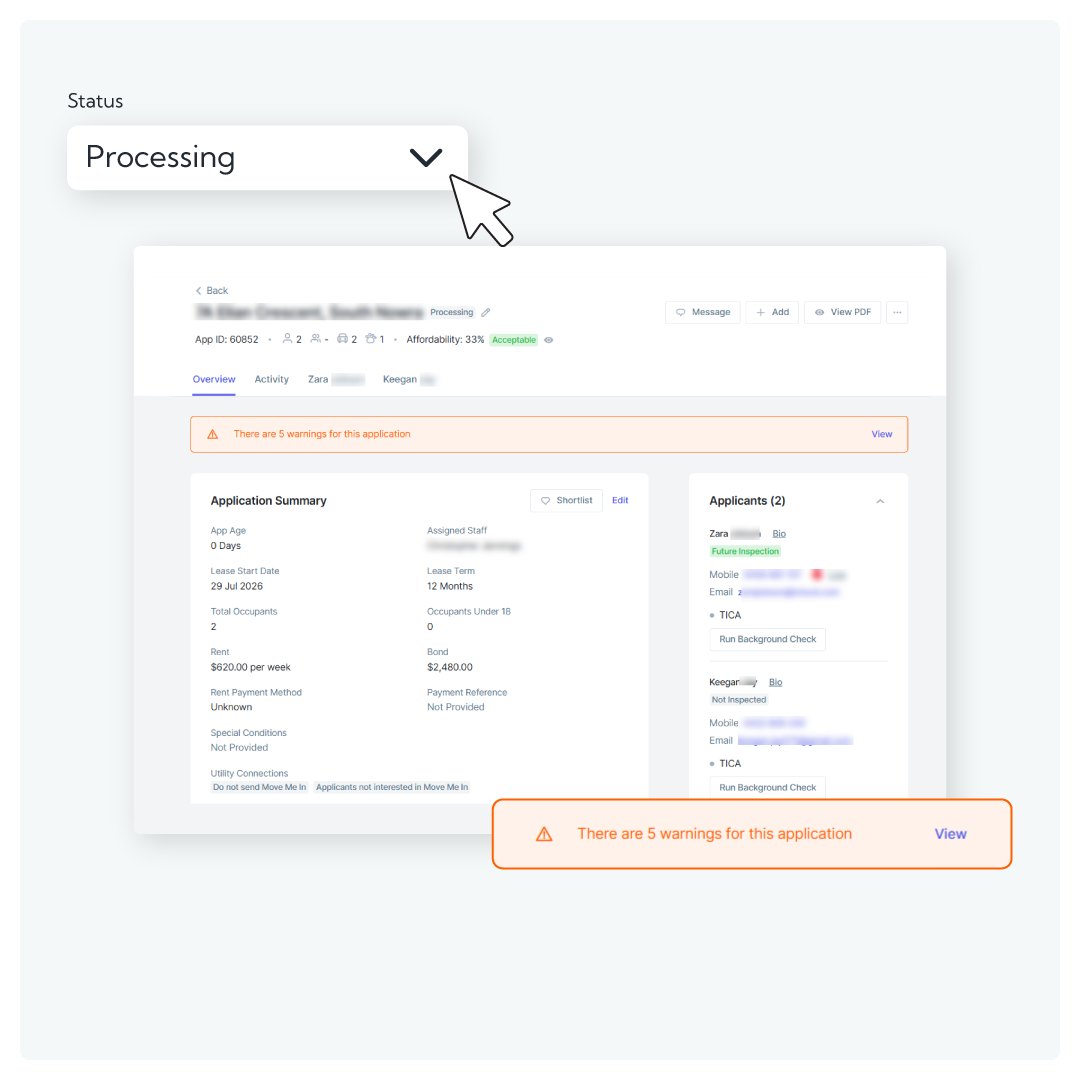
- A cleaner, clearer header: The redesigned header puts the key application details front and centre, so you know where you stand the moment you open an application.
- Activities tab: the full story of every application: A new Activities tab records what's happened on an application, and you can filter it to find what you need quickly.
- See exactly what was sent, right where it happened: When a status changes (for example, to More Information Required), you can now view the messages sent to the applicant, owner and agent from Activity. There's no need to dig through the email log.
- Warnings now front and centre: Important warnings move to the top of the page, where you'll see them straight away, instead of sitting several clicks deep
. - Review All: check every ID in one flow: Step through each ID in turn and mark it checked or flagged, without bouncing back and forth between documents.
- Simpler ID processing: Files, points and status are shown in one simplified view. Check or flag an ID in a couple of clicks.
- Database check status at a glance: Each applicant's database check result now shows on the Overview, with green for a thumbs up and red for a thumbs down. You can see the state of an application without opening every check.
- Works wherever you work: The new page is fully responsive, so you can process applications on an iPad between viewings.
Frequently Asked Questions
If your Lettings offices cross over state boundaries, we'll switch on the new Application Processing experience for all connected offices at the same time. So, if one of your offices is included in an earlier rollout group, the update will be enabled across all connected offices together.
No. The functions available in the old interface are available in the new one. Nothing you rely on has been removed.
Applicant details, owner details and summary are now all in one place, including each applicant's database check result and a Shortlist button, so you no longer need to hunt across multiple tabs.
From the Activities tab. When a status changes (for example, to More Information Required), you can view the messages sent to the applicant, owner and agent, and filter the Activities tab to find what you need.
Important warnings now sit at the top of the page, where you see them straight away, instead of several clicks deep.
Files, points and status are shown in one simplified view, so you can check or flag an ID in a couple of clicks. Use Review All to step through every ID in one flow and mark each as checked or flagged.
Yes. The new page is fully responsive, so you can process applications on an iPad between viewings.
It rolls out by state and country on these dates.
NT, TAS, NZ: 20/10/2026
SA,WA: 27/10/2026
NSW, ACT: 10/11/2026
VIC, QLD: 17/11/2026
Yes. While you are getting familiar with the new page, the old UI is temporarily still available under the top right action button in the application.